Saturday, May 18, 2024

The Project is a Highway Retro Format


I was recently asked to facilitate an agile retrospective for another project here at SEP. After reviewing their project, I realized I didn't want to do one of the existing retro formats I knew of, because I was feeling like there was something missing from some of the standard ones (such as Sailboat). I decided to experiment with making my own. Thus was "The Project is a Highway" retro format born!

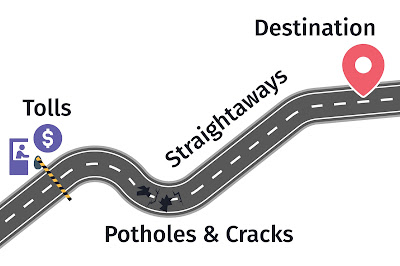
I was inspired by the fact that the project was related to roads and leaned into the metaphor. Take a moment to look at the drawing above (created by one of our talented UX folks).

Here's each part of the model:

Tolls - These are prices you pay knowingly, usually to make the project better in the long run, or compromises that are required for business reasons (adding some tech debt to make a big milestone, using a certain technology to match the rest of the business, etc.) Are there any of these that might have been avoidable, possibly with different decisions in the past? Did any past decisions affect this work? There's nothing wrong with having some of these, but it's good to acknowledge why the project paid for them.

Straightaways - These are areas where the project went smoothly. What made them smooth, and can you get more of this in the future?

Potholes & Cracks - These are unexpected snags in the project, causing you to have a rough time, or to work around them and end up slowing down progress (unexpected end of life on a tool, for example).

The Destination - Did our destination change as we worked? Do we still have a vision of where the project is going? Do we all have the same vision? What comes next for the project that we should talk about?


After using this, I reflected on what, exactly, I liked about it over some other retrospective frameworks. One realization I had is that I like the Tolls metaphor specifically because it calls out that we sometimes make deliberate decisions to slow down feature work, which some other frameworks don't cover.

Monday, May 15, 2023

Testing Code Review

 The other week I was asked by someone on the Testers Slack for how I go about doing a code review from the perspective of a tester. I figured that I should share this in case others are interested in my thought process for it. This post will be my idealized thoughts on it, even if I sometimes shortcut a bit.


First thing’s first, know what you’re reviewing


First, a mea culpa from me. I have definitely skimmed this step more than I should in the past, and it usually means I need to go back and figure out what I missed.


What I mean by this is that you should take the time to review the story/requirements up front. If you’re not sure about a requirement or an acceptance criteria, ask the person whose work you’re reviewing. If you both have different understandings of the work, then talk to a Product Owner or some other domain expert.


Feel free to jump back to the story as reference.


Second thing’s second, focus on what the team relies on you for


If you’re a tester (or performing that role for the team), don’t focus on the code itself. Look at the tests that are there, then look for tests that you think should be there. Looking at the code is also useful, but not where you’ll add value to the code review.

Make sure to comment not just on the contents of the test, but also how it is constructed. Make sure that patterns and styles are followed correctly.


Miscellaneous thoughts


Most of my career has focused on system and UI level tests. I do sometimes review integration and unit tests fairly closely, but I tend to take longer on those (and the developers are typically more responsible for that level of testing). If you’re more focused on those levels, it probably makes more sense to focus on the code more than I do.

If your process is like ours, code reviews are open to everyone, but one person is typically the main ‘reviewer’ who looks into the code review more carefully than others. Typically, I mark myself as the main reviewer if the tests are a main focus of the review.


Tuesday, February 5, 2019

You Are Valid

Drink some water.
Eat some food.
Take your meds.
Take care of yourself.
You are valid.
You are loved.

These (or similar) are words you hear a lot from the LGBTQA community.

And there's good reason for it. Many queer folks have had traumatic experiences (warning, heavy topic, includes mention of sexual assault, assault, and suicide, especially in the links within the article) that have left them with cases of anxiety, depression, and other medical conditions that they have a hard time handling on their own.

So, a lot of kind and wonderful people make it a point to post these reminders regularly.

And really, who hasn't needed a reminder for something in their life?

I'll break each line down into why I think they're important:

Drink some water

    It's pretty easy to get dehydrated if you're not careful, and drinking water has plenty of health benefits.

Eat some food

    This helps keep you going. It's also important for those who have blood sugar issues to keep up their mood and energy level.
   

Take your meds

    If you have a mood disorder, it can be easy to forget to take your medication, including some that helps you to keep living! Many Queer folks use medication to improve their quality of life.
   

Take care of yourself

    Self-care is an important thing to do. Take a day off, read a book, listen to some music, seek help from others, professionally or otherwise. These are all important steps to take regularly in life.
   

You are valid

    Too many people in the LGBTQA community get told they are "just going through a phase" or "that's not natural". Letting people know that you acknowledge them for who they are can pick someone's day up.
   

You are loved

    This one is probably the most important one for me (and something I should say more often). People are deserving of love just by being. No one should be excluded from that, but some people in the LGBTQA community have been hurt by those who should be closest to them.


Finally, if you or someone you know are having struggles, please reach out. These may help (USA-Specific):

1-800-273-8255 - Suicide Hotline

877-226-3111 - Addiction Hotline

844-228-2962 - Eating Disorder Hotline

877-455-0628 Self Harm Hotline

https://www.thetrevorproject.org/

https://suicidepreventionlifeline.org/chat/ (for those who don't like phones, or can't call for whatever reason)

Monday, August 29, 2016

Lacking Motivation: How to Restart Your Testing Brain

I came in to work today and had one of the things I dread hit me:

A lack of motivation.

This is hardly new. Everyone's had a lack of motivation.

Sometimes it's chronic (in which case, I suggest researching why and fixing that if you can!).

Sometimes, like mine is, it's probably caused by a bit of a feel of repetitiveness in my work lately, combined with not having as relaxing a weekend as I wanted.

But somehow, this morning I still got a decent amount done.

In the hopes that it can help someone else in a similar spot, here's what I did:

Get Focused

First, I cleaned out my normal drinking cup and got some water. I've found that some minor cleaning or other non-mental work helps prep me for doing something mentally engaging.

Get A Quick Win

I had two tasks that were in my queue this morning. One was going to be long, monotonous (as I have to do the same checks across various platform combinations).

I took the other one. It was a straightforward bug, simple to test for, but with some neat little edge cases I could prod.

Springboard off the Quick Win

After I felt good about the main path through the bug, I started on those aforementioned edge cases. While I didn't find anything crazy, it did fire up my mind, bringing my motivation levels back up.

Now it's on to the bigger, more intensive task, with more confidence and energy than I could have given it otherwise today.


So, what do other people do when they're really unmotivated?

Monday, September 14, 2015

How to (Cala)bash your applications in iOS


This is the first blog post in a series for getting Calabash-iOS up and running on a Mac with Yosemite.

Some Background...

I was recently asked to kick-start an iOS testing effort for a project here at work.

Unfortunately, I'm not really a Mac person, nor had I used one in quite a while...let alone tested on one.

So what did I do? I immediately made several mistakes.

Mistake 1: Instruments

First, I tried out using Apple's built in tool for automated testing. While it's useful, it's not nearly as friendly as Calabash (thus the name of the post).

Mistake 2: Forgetting others had done this

After asking around, I was reminded that we had another group do work on iOS, including automated tests!

While it was a year or more back for most of the people who had worked with it, I found out through them about Calabash-iOS.

After digging into Calabash, I found it a more intuitive tool.

Basically, Calabash wraps Instruments, hiding some of the uglier parts, while providing some good functionality for testers to hook into.


Putting it all together:

I found an amazingly well-documented pair of blog posts (here and here) for installing everything you need to set up and run Calabash-ios through Ruby. I've copied out the relevant steps below.

Installing RVM and Ruby 

  1. Use CMD+SPACE to open up Spotlight (the equivalent to run in Windows)
  2. Search for Terminal (the Mac equivalent to command line)
  3. In terminal, run the following line
    curl -L https://get.rvm.io | bash -s stable --auto-dotfiles --autolibs=enable --ruby 
  4. Quit and relaunch terminal, then try the following commands:
type rvm | head -1
    rvm -v
    ruby -v
If all was installed correctly, the first command should return 'rvm is a function', and the other two should return their version numbers.

Installing Cucumber and Calabash 

  1. In Terminal, navigate to your project directory
  2. Run the following command to install calabash
  3. gem install calabash-cucumber
  4. Once that is finished, run the following command to generate the files and folders calabash needs
  5. calabash-ios gen
  6. Open your project in xcode, and verify that you now have a duplicate of your scheme with a suffix of '-cal'
  7. In xcode, go to Targets > Build Phases > Link Binary
  8. Add "Security.framework" there
  9. Select the new -cal project, select a simulator, then run it.
  10. There may be a prompt to accept incoming network connections. Allow that if it displays.
  11. The following should appear in the console output. If so, everything is installed correctly:
Creating the server: <LPHTTPServer: 0x8076530>
Started LPHTTP server on port 37265
Bonjour Service Published: domain(local.) type(_http._tcp.) name(Calabash Server)


You should now have a fully-functional set of calabash tools to explore!

I'll make another post about actually writing Calabash tests, and getting them running.

Sunday, November 10, 2013

The Possibilities are Endless...But Your Tests Shouldn't Be

Many years ago now, I was fortunate enough to attend a talk by Cem Kaner about testing. It was a defining moment in my testing ideology's development. The talk involved several points, but a majority of it focused around return on investment.

As it turns out this appears fairly often in the testing field.

This leads into the discussion of test automation. Test automation can have a great ROI, but not always. You can end up spending hours, days, or even weeks automating low-risk and low-importance parts of your project with intricate tests that break constantly, when a manual test would have been far simpler, easier to maintain, and freed up time to grapple with more important problems.

Here's some things to keep in mind for ROI in automating a test:

  • How often should the test be run? If it's a throw away test or an exploratory test, it probably shouldn't be automated (though some of the setup can be).
  • What is being tested? If you're checking for text on a page, then it's almost always a good candidate for automation. If you're checking that screen elements are in their proper places, or that audio quality is where it should be, that is probably better done with human eyes.
  • Are physical devices or objects required for the test? For instance, in a login, is there a One Time Password generator that has to be used? If so, you may be able to write a simulator (or disable it for some tests), but at some point, it's best to use the actual device to make sure that nothing is wrong.
  • How fragile is the test? Some tests are fragile because the tested area is still under development. It may be best to re-prioritize that area for later. Other times, the tested object may have some non-deterministic quality that requires constant adjustment. In this case, visual verification may be best.

If you have any other good tips, comments, or disagreements, I'd love to see them in the comments below!

Tuesday, November 5, 2013

Security, or 'What you have, what you are, what you know'

After reading this blog post by Laurie Gavin, I felt I should post something in response considering my limited time in the security world with a former company.

Learning your 1, 2, 3s

Most people log in to websites or their computers using a 1 factor authentication system. Usually, this is your username and password combination. It's a 'what you know' authentication factor. Technically, it's two pieces of information, but that doesn't really make it more secure.

Issues  with 'what you know' systems:
They're guessable or brute-forcible in some circumstances
They require commitment of memory from the user
If reused, weaker systems can be used to get data from stronger systems

Biometrics, as mentioned in Laurie's post, are usually used in 2 or 3 factor authentication. They represent the 'what you are' factor. This is generally a bit more secure (assuming it is implemented correctly), seeing as you hopefully rarely leave pieces of yourself at home.

Issues with 'what you are' systems:
Your body changes over time, this can cause false negatives
They can still be hacked, though it is more difficult.
There may need to be workarounds for those without the required body parts (missing fingers, hands, or even eyes).

One-Time Passwords, smartcards, and other tokens form the 'what you have' security factor. This is usually a physical item (though can be a bit of software for soft tokens) that the system scans/reads. These sorts of authentication were designed to help prevent someone half the world away from impersonating you.

Issues with 'what you have' systems:
Physical objects can be lost, stolen, or damaged, requiring replacement
Sometimes they can be duplicated (or the data on them duplicated)

Note that any of these factors have vulnerabilities, but using 2 or more provides a layered authentication system, requiring more work to get into your account. If you ask me (and you probably didn't, but I'll tell you anyway), we need to move to at least a two-factor authentication system for any important accounts. There have been far too many leaked passwords to make me comfortable with 1 factor authentication anymore.

For more reading.

Wednesday, September 18, 2013

Myopia, or Why We Missed That Bug

Back in college, I had a roommate named Matt.

Matt and I both played an MMO called World of Warcraft (who knows, maybe you've heard of it?)

The interesting thing is that we both played it two completely different ways. I used the mouse almost exclusively, and he almost exclusively used the keyboard.

He was shocked I could play it that way (and pretty effectively, as he can still attest).

The blind spots we have in how we go about doing things with computers (like our gaming predilections above), can have a big impact on how we test. I use the mouse far, far more than I use the keyboard when given the option, and it reflects in how I test applications (I click buttons to submit forms, rather than using the enter key), and not giving proper thought to it can cause issues.

I'll give an example:

A while back, I worked on testing a piece of software developed for Palms (so definitely a while ago now). Each screen had many, many tiny drop-downs and text entry fields, most of which I couldn't reliably hit with the stylus during testing. After complaining about this to someone else on the team, it was pointed out to me that I was not the target audience.

I was working on software that would be used by surgeons. As it turns out, they tend to have a much easier time with precision pointing. My entire context for why I thought of the user design as bad was flawed.

And another, from a more recent project:

I had been testing this software for several months when the team was invited to view actual users working with the predecessor to our project. Going through the various groups of users, we eventually came to some who used the product differently than the others. They had on gloves, and worked with substances that they didn't want contacting the keyboard, so their entire interaction with the application was through hotkeys.

Pause a moment, if you would, and look back at how I have admitted to using applications. Can you guess whether I used hotkeys or mouse clicks in my test?

After that day, my tests had a mixture, and I had another viewpoint to look at while writing tests.

How do we fix it?

You can't rid yourself of all of your blind spots and predilections, but you can do a few things to help mitigate your own myopia:

  • Other testers can point out flaws in your tests, where you might be missing a way of doing something in the application (do you always click the Save button instead of using Ctrl+S?)
  • Groups of users can be polled for feedback (and this is a core way of doing usability testing)
  • Be aware of what you are bad at. When you find out about some way of using an application that you don't do naturally, write it down, and try to include it into your way of thinking.
Now, if you'll excuse me, I need to go click some buttons and press some keys.

Wednesday, January 9, 2013

Windows 8 Wars

I was recently (well, two months ago) tasked (because I was the one who asked about it) with experimenting with TestComplete on Windows 8.

For some background:

TestComplete is a tool for doing system testing here at work. I haven't used it before coming here, and have only used it on Windows 7-based projects since working here. (For more information about TestComplete, feel free to visit the parent company, SmartBear. Don't worry, this blog post will still be here when you get back.)

Attempt 1: The VM Menace

My first attempt was to setup a Windows 8 VM on my work machine, install TestComplete on that, install some software that I had tests for already, execute the tests, and go home happy.

If you look above, I said 'two months' was when I got this task. You can imagine that this did not go as planned.

VMs are great testing tools, but in this case, Windows 8 was not supported very well by my VM technology of choice (VirtualBox). I had issues with getting the network connection working. This caused some fun issues as I tried to debug it. Ultimately, this attempt taught me that VMs are not always the best places for trying out new technology.

One other note is that during this time, SmartBear was running its own testing program for TestComplete for Windows 8. Sadly, I dropped the ball on moving fast enough into the next section to help them back with feedback here.

Attempt 2: The DB Wars

My next attempt was helped out tremendously by the man who volunteered me for this task Raman (I don't have a good link for him...you're on your own for this one). He was able to procure me a laptop with Windows 8 already installed and ready to go. This proved significantly easier than the VM.

Getting TestComplete itself installed was simple, as was getting the necessary files for the application I was going to use for testing.

Unfortunately, once more, I had issues with VMs and Windows 8. This time, it was setting up a server VM on the Windows 8 Machine. After several coworkers offering assistance, I was still unable to connect the VM to the main machine.

After several attempts, Winter break came, leading to...

Attempt 3: Revenge of the Tester

During the break, I rested and plotted my revenge against the Jedi Windows 8. It was during this time that I realized I had another application I could test, one that didn't require setting up another VM or connecting to a server.

After doing some setup in TestComplete, I fiddled with some simple tests, and learned the following:

They worked just fine.

A lot of build up for not much of a shocking discovery is sometimes a good thing.

During this time, I also did some research and found that SmartBear is informing their customers that they do not yet handle Metro applications.

So, to make a long story even longer, some lessons I've taken away from this:

  • Time box your exploration of new technologies. While I already knew this, it gets much more difficult when it is more of a side-project.
  • When exploring something, know that you may have to drop it for a while if life picks up around you. Keep good notes.
  • Always get help when you need it. I have worked at SEP for a while, but it was nice getting a lot of help on this side-project from coworkers, from advice, to laptops, to hosting VMs.
  • TestComplete (at least the latest version) works well on Windows 8. I'm sure there will be some gotchas in the future, but I don't see any fatal problems. I look forward to them working out the Metro issue, and being able to test those applications as well.
  • I miss the Start Button.
  • Every time I use a new laptop, I have to find out how to disable the touchpad again.
  • Writing a blog on a Windows 8 machine is basically the same as writing one on a Windows 7 machine.

Monday, November 12, 2012

The Optimistic Programmer, The Pessimistic Tester

I've always believed that part of being a good programmer or being a good tester (or being a good anything) involves having the proper mindset.

In this, I think that programmers need to be optimistic. What I tend to focus on though, is the pessimistic tester. (I know you're surprised by this, what with my lack of obvious bias. :) )

For testers, I think a healthy dose of pessimism is required. When someone says "This feature is finished now." It's the tester's job to say "I'm not so sure it is...let me look at it."

(As a tip, if they act nervous at this point, they may have just lost their optimism...and the tester may have a fun time finding bugs.)

Note that when I say 'a healthy dose of pessimism', I don't mean to say that a tester should expect everything given to them to fail, but that they should not assume that something works, simply because it was given to them as 'complete'.


So, next time that you're given something to test, or, as a programmer, look at it really hard, think pessimistically, and say "Is this really complete?"

The answer could surprise you (or not, if you're pessimistic)!

Monday, October 29, 2012

I Don't Have Time

I hear this sometimes.

I say this sometimes.

We're doing a blog battle at work, and so I figured I would participate. It's also a handy excuse to blog again, since I have a couple of topics that I have been meaning to write on anyway.

A lot of my coworkers have looked at the phrase from a personal responsibility way, so I won't go down that road.

I'm going to look at it from the outside.

When someone tells me that they don't have time to do something, I try to figure out what they mean by it. It usually breaks down into one or more of the following:

  • "I want to do it, but I can't do it right now, or in the time frame you have given me."
  • "I don't want to do it, but I can't think of a good reason beyond some work I could do now."
  • "I don't really like you, and this is a polite way of saying so."
If I can figure out what they mean to it (sometimes using the esoteric method of 'asking them'), I then try to figure out how I can help.

If they can't do it in the time frame I asked, maybe I can loosen up my schedule. Obviously, this sometimes can't happen (I can't affect when a client or customer needs something by past a certain point). Alternatively, I sometimes can help take something else off of their plate so they can do something for me.

If they don't want to do it or they don't like me, I generally try to find someone else. There's generally no reason at all to try to force someone into it. Well, unless it's their job...but that's probably the subject of another post.

Tuesday, November 29, 2011

Beta Testing this weekend, or Why I was a Jumping Jedi

This weekend was swallowed up by Star Wars (well, and just relaxing after a long period of work). As a good number of you know, Star Wars: The Old Republic is coming out fairly soon, and they are having Beta Testing weekends (basically, they randomly choose people to play for a weekend for some stress testing of their systems, as well as encouraging them to send in bugs that they find).

Being a tester, and a Star Wars geek, this was kind of like a piece of Heaven.

Unfortunately, this game and I have a rocky history already. If you want to hear about the game itself, skip the next paragraph or so.

I tried to preorder this game a few times, and there have been issues each time with getting the preorder code (basically it gives you a few more perks in game, and lets you play a bit earlier than everyone else, which I was hoping to take advantage of). These issues have been with stores and EA (the game's publisher) both informing me that it wasn't their fault, it was someone else's, EA's customer support giving me the run around on four separate calls and four individual replies, and finally with some issues I have with EA's business practices in general. I've been tempted to cancel my preorder...but it is Star Wars.

Below are comments I made during the beta. I kept a notepad++ window open on my laptop while I played, just noting whatever I could. I am keeping them in the order I wrote them, simply for convenience, and to let you see a bit of my thought process. The main bullets are the original writings. The sub-bullets are commentary made while thinking about them later.


  • The opening cinematies feel like you're watching Star Wars
    • Okay, so this game is Star Wars. I know that sounds silly when it's in the title, but I'm talking about something else. You can't watch the opening movie without feeling that rush of watching Star War's opening, or the excitement from lightsaber duels, or the cockiness of Han. It's all there, right in the opening, and it doesn't really go away.
  • Taking a day for the beta to download, plus having problems that were only solved by restarting the client.
    • This was awful...and it was only solved by restarting the client. There weren't any directions, and it made me crazy to know I had lost a day of playtime to such an annoying issue. (To be fair though, I could have downloaded the client before the weekend and possibly avoided this, but it would have still been frustrating...mostly for the lack of direction on what happened, and what to do after).
  • On the plus side, the redownload was quick, as it used what it had before.
    • I was really happy about this. I didn't feel like waiting hours and hours again just because it failed the first time. Apparently the downloader was at least smart enough to salvage what it could.
  • Works with my left-handed mouse
    • Skyrim does not, and I can't tell you how annoying it is to deal with that. Games need to use the OSes mouse mapping, and not try to do things on their own.
  • I feel like the entire starting Jedi area is dead...why won't any of the other Jedi talk to me, or at least let me hear background conversation?
    • This was creepy. There were lots of NPCs who were just window dressing...no discussion, nothing beyond some basic animation...some weren't even clickable! I was slightly worried I had some lag or a crash at first. It just took me a bit out of the game, which is something I dislike.
  • It already mentioned I discovered the Gnarls at the start of my playing time, but now I have discovered it again?
    • This one was odd. You discover places and get XP for the discovery (similar to WoW where you reveal more of the map and discover a place once you have gotten through some portion of it). The first discovery came in the opening cutscene for my Jedi character. The second was when I actually went to that portion of the world. 
  • Binding? I'm assuming that's for death.
    • Neat little consoles are for 'binding'. It turns out they're for fast travel...I won't tell you how that's flavored in game, as it was a really neat little treat for me, and I would hate to deny you the experience. I will say though that you want to make sure to activate all of the bindings you find. You will regret it if you don't.
  • Two vendors standing next to each other who have the same voice makes me sad.
    • No joke, I felt shocked out of the game for a moment. I couldn't believe that had gone through, as it was really weird to listen to back to back merchants who sounded like identical twins (and weren't, by the by, I checked).
  • I also dislike when NPCs aren't clickable at all.
    • Going back to my earlier complaint, this just seemed strange. I just wanted to click on these random people, learn their names (or titles), hear them say hello, or even just ignore me, but having them just not clickable made them feel like props and not NPCs.
  • Some of the tip prompts came too late, specifically: Combat, inventory, equipping, Vendors, Bonus Objectives, Specialty Goods
    • There is a tips system. They are supposed to pop up when something new happens to you. Combat, selling items, getting something interesting from loot, etc. Unfortunately, sometimes it took the second or third time for one of these to happen to trigger the pop up. The ones listed above are the ones I noticed, but there might have been more.
  • Bonus missions will be a blessing and a curse for crowded regions and popular quests. (Not all missions have bonus missions attached to them)
    • This was a really cool addition. There aren't a lot of regular quests involving 'Kill X wampas, sandpeople, etc.' They wrap those up as bonus missions that you find by starting on that path (so you kill the first Wampa, and it shows up as "Bonus Quest: Clearing out the Wampas 1/10 killed"). It's a really fun system, but I'm slightly worried that it might cause some places to get rather crowded as people find out about them, and hunt for the bonus objectives as well as the main quests they are completing. That said, it is certainly not a new issue, and these at least aren't the focus of the game, so I think people will skip them a bit easier than normal missions.
  • Decent gradual introduction to game elements.
    • This one was pretty key. I started to get a bit swamped with combat options at the end, but otherwise, I felt like I was given a nice, gentle introduction to all of the game's elements in the starting area. Nothing really required me to puzzle out what the game needed me to do, which can be a problem with some games.
  • The camera swiveling seems a little too sensitive by default
    • Not too much to say here. I turned it down, and didn't have any issues with camera swiveling afterward.
  • Why are there both 'help' and 'tips'? They seem way too similar. Also, can you get back to tips you've already seen or accidentally closed?
    • There were some 'help' popups that occurred in the game. I have no idea why they did that as well as the tip system. I also have no idea what one of my tips said, as I closed it accidentally, and never went hunting to find out how to re-enable that one.
  • It's hard to get used to no auto-attack
    • This may be the single most awesome mechanic in the game. There is no true auto-attack. You actually have to use your abilities in order to fight (now, there seems to be one skill that each class gets that is their 'default' attack, but even then, you still have to trigger it manually). It was hard to get used to at first, but afterwards I really enjoyed it. It made me feel like I had to pay attention, unlike in some games where auto-attacking weaker enemies was all that was required.
  • [SPOILER] didn't actually look like it happened in the cut scene.
    • At one point, there was a bit of scenery that should have changed due to a cut scene, but it looked like it always did...I'm hoping that's a graphical glitch on my part.
  • My character has a bit of a crotch bulge...I suppose that's fair in gaming though, considering how women usually look.
    • Yeah...this one I noticed randomly while trying on new gear. I was more amused by it than anything else.
  • I like the various cutscenes for missions, makes it a bit more immersive.
    • This is the part of the game that makes it feel like an RPG more than most MMOs. Each quest has its own cutscene, complete with full dialog and some conversation path options. I was able to be the serene Jedi, the sarcastic Sith, and the business-like Bounty Hunter. In addition, if you are in a group, both of you make decisions and participate in the cutscene together. They really put effort into making the game into a story, and it shows.
  • I also like that the world seems at least semi-dynamic...those Jedi Watchmen weren't in the grounds to start.
    • At one point, I noticed that some Jedi had gotten down into the grounds and were fighting the enemy, when they weren't before. I didn't notice anything similar after, but I am going to pay more attention when/if I play again.
  • Light side dialog sounds like I think no one can do their jobs...or at best like a meddler.
    • There were a few times, especially early on, where it felt like being a Jedi was kind of like being a nagging mother. Thankfully, this isn't all the time.
  • Random reward is random - Why do I get my mission rewards in the middle of nowhere?
    • I don't recall which mission this was, but it was interesting to get a pair of boots in the middle of the wilderness after completing a (I think) bonus quest.
  • Durability should probably be discussed in a hint early on
    • I never noticed a hint for this, but your weapons and armor degrade from use. You can repair them at merchants, but it was something I had to find out for myself.
  • The empty seat at the Jedi Council meeting is talking to me. :(
    • At one point, you talk to the Jedi Council...and for me, the cutscene was missing someone. The camera kept switching to an empty chair...and dialog came out of it. I never did see that Master, but I assume she was a ninja as well as a Jedi.
  • Master Muheeda's survey - %questName shows up for the name of the quest
    • They prompted you in game with surveys. Some were random, some were regular. In this case, the survey's questName variable showed up instead of the actual name of the quest. I noticed it a few times while playing.
  • Location of graphical glitch (consistent) x:-360 y: -387 z:-49, Jedi Temple, upper floor
    • I found a fun graphical glitch, nothing major, and something I've seen in released games, but it was amusing.
  • Empty line after 'invite to join a group' line
    • Just a blank line in the chat log, nothing really exciting (beyond meeting some other cool Jedi)
  • Reward selection doesn't appear intuitive
    • I believe this was when I first got a 'select your reward' option. There's a section for rewards you will get, and one for which reward you can choose. The text was a little small, and I don't think it was really prominent.
  • Oh wow, I love multiplayer quest turn ins.
    • This was when I first found out about multi-player cutscenes. They really are just neat.
  • The 'alerted' message seems to always show up...whether there are enemies or not.
    • There was a little eye that was open if there were enemies around (or so the hovertext said). I never did see that eye close.
  • What you say does not match the dialog options.
    • This annoyed me. The dialog options would say something, but then the character would say something similar, but not always really the same as the dialog choice you saw. It sometimes made my Jedi sound snarkier than I meant him to be.
  • Cutscenes have some lag.
    • Lag reared its ugly head several times (and I saw in chat that other people were experiencing it), but nowhere was it more prominent to me than during cutscenes. Sometimes there would be a long delay between lines of dialog.
  • Sometimes the return quest marker doesn't appear.
    • To clarify, I mean over the NPCs head. It appeared just fine in the minimap and on the map.
  • The flesh eating baby quest should probably have a darkside option (leave the baby)
    • I'm leaving this one here. I'll give you a hint though, it's one of the Jedi starting planet quests.
  • Master Meeb Wix's quest (Flesh Raider Fact-finding) does not show a quest icon over his head to start it (it does display on the mini-map though)
    • Similar to the other issue I saw, but I don't recall seeing this with any other quest NPC
  • Found a bugged quest indicator for a manka cat tooth at x 305 y 164 z 7 on Tython
    • I actually ended up seeing these a few more times. Basically, it looks like sometimes their indicators for enemy types to kill and items to find off of enemies would sometimes be buggy.
  • Dark Temptations rewards: The ordering of the Customizations goes 2, 3, then 1
    • Just an odd little bug I found. I'm not sure how this one happened, but I am sad I lost the redhead (again, amusing hint to what happens, which I won't say more of).
  • Not Eligible for this conversation appears for two twi'leks. Bashenn and Vanel
    • I saw this a few times...I think it was class-specific conversation, or triggered by a quest, but I never did figure out a pattern to it.
  • Conversation between two NPCs got an odd clip where one answered well after I had left the area (10-20 seconds)
    • There are a few random NPCs who have conversations around you. This one I had heard a few times, but once they cut off for a while...then continued once I was well out of ear-shot (well, virtual ear-shot)
  • Strike is showing an 11 minute cooldown for some reason, despite the fact that it doesn't have a cooldown beyond the global one.
    • Strike is a Jedi ability. I think this might have been some weird lag I was having. I managed to still fight with this problem, but it was a bit annoying.
  • Combat training droid questline: Problems are that the quest giver is too repetitive in his responses, the quest areas get really crowded, and it takes a while for the activation panel to reactivate after use by someone else.
    • He was constantly astounded at how well I was doing...and after a while, I would have figured he would guess that I might just be good at fighting training droids.
  • Companions are required
    • Oh man, do not go anywhere alone once you get one. The game is balanced around the fact that you won't be alone after somewhere around 7th-9th level.
  • A few minutes after the 15 minute warning that the servers were going to reboot, I finished a cutscene, and was kicked from the server. Internal Server Error 3. In addition to this, my mouse cursor wasn't moving correctly (only allowed me to move it in a small area, like the scaling for movement was off). It fixed itself after the server list loaded fully. (The UI is not responding after this, though I can see the server list refresh.)
    • This one was odd. I assumed it had to do with the restarting of the servers, and not anything that would normally occur.
  • Rested state description when you hover over your XP bar has a typo in it. "You can get into a rested state by loging out of the game in a cantina."
    • Because it wouldn't be testing without me finding a random typo or grammatical error. :)


Well, that's all I had. Now I just have to decide if I want to play this game or not...and by that, I mean do I want to support EA after all the headaches I've dealt with.

Time will tell, but until then, May the Force be with You.

Tuesday, October 25, 2011

Night of the Living Manual

As I mentioned in my previous post, I have had some issues recently with SourceForge, so I shall be using that as my springboard into living documentation.

While attempting to discover how to add a member to my project, I tried exploring the site somewhat, and then finally gave up and looked at the help documentation.

Here is the link I found: http://sourceforge.net/apps/trac/sourceforge/wiki/Add%20a%20project%20developer

Needless to say, that did not work. If you check the history link for that page, it was last updated two years ago.

This goes into 'what is living documentation?'

Living documentation is documentation which is updated continually throughout the life of a software project. This includes things that the end user will see (user manuals, help files, support pages), and things that are internal to development (requirements documents, scope documents, defect tracking, test plans and test cases).

I feel like making a seasonal pun, feel free to skim past the next line.

You don't want to allow your documents to rest in peace, because more than likely, they'll rise back from their graves to bite you later (and I'm sure that becoming an undead document yourself would be a trifle inconvenient, not to mention painful).

Living documents help bring new team members up to speed quicker, and allow users to find out about new features or newly found bugs (and temporary work arounds) that might otherwise remain mysteries. They also keep you in compliance if you are working in a regulated industry. They also prevent inconsistent knowledge within a project. If Peter the Project Leader reads an old document, and assumes that feature x is still in, when Terry Team Lead had it removed two months ago, Peter will not be pleased when he finds out that he sold a non-existent feature to a client.

So, why is it that living documentation dies?

  • People get busy. Software teams aren't always staffed quite as well as they would like, and documentation sometimes falls by the wayside, especially if a lot of changes happen rapidly.
  • Documents get lost. This happens especially when teams are distributed, documents are passed around outside of any version control, or document control systems are changed (switching from word to a wiki, for instance)
To prevent these issues, you can designate someone on the team to have a recurring task to make sure that all of the documents are updated. You can also push people to get into the habit of updating documentation as soon as requirements change, bugs are found, or scope increases/decreases. And of course, nothing helps more than practice.

So, in a reverse of my last post, does anyone have examples of great documentation they have had the pleasure of using?

Bad UI Design, or "Wait, I can do that? Why didn't you say so before?"

So this is a topic near and dear to my heart for several reasons, and I'm talking (well, typing) about it now for a few reasons:

1. I've had issues with projects with terrible, bad, or just incredibly unintuitive UI design
2. I've recently tried to start a project on SourceForge, and found that I cannot seem to add another user to my project.

Why are these things frustrating for me?

  • Well, I use software, and when I can't find something I need on a website, in a program, or on my OS, I lose productivity and/or sanity (depending on the problem).
  • I also test software, as some of you may have figured out from the title (I pride myself on my subtlety), and a bad UI design not only sometimes makes it difficult to test (some non-standard GUIs are more difficult to automate than others), but I also consider these to be Usability bugs.
(As an aside here for those of you unfamiliar with the term, here is the wikipedia article on usability)

I consider usability to be one of the most important aspects of a program, right after and sometimes neck and neck with functionality, and attempt to push for these bugs to be fixed quickly.

The reason for this is fairly simple to demonstrate.

Think about the last time you went to a new website, or tried out a new program (alternatively, go to a new site right now, I'm sure you can find one soon. I'll wait. Back? Good.)

Was there one thing you wanted to do in your program, or one piece of information you wanted to learn from the site, that you just could not figure out? How long did you keep trying with that site or program? 2 seconds? 10 minutes? After a while, you give up.

And that means that the software failed. Whether it has the most miraculous features, the fastest, most efficient algorithms, it means nothing if your users can't find them, or can't figure out how to use them.

So, what was the last feature you tried to use that you just couldn't find/use?

Friday, September 30, 2011

Burning some XP or I don't like wearing shoes, but I do use them

So my blog post this time is a bit different. I figured I would just put what I've been doing recently, as well as what I plan on doing:


  1. Japanese: I've been working with a group of friends online and in person for learning hiragana (so far). Mostly I can recognize 1/3 or so of the characters. My plan is to be able to write and recognize all of them by the end of October, as well as be able to pronounce/recognize some basic words and phrases. Our group is using this book: http://www.cheng-tsui.com/store/products/adventures_japanese
  2. Braille: oddly enough, SEP (Software Engineering Professionals) has an interactive art project with a braille board. I've found that I've started to recognize a few of the letters when I go by it, so I've been trying to actively learn the patterns.
  3. Reading The Passionate Programmer: It's a book about being enthusiastic and successful with your work. I'm finding it actually really interesting so far, and I've been trying to apply some of those lessons to my career, which brings me to...
  4. Shoes: This is a GUI package for Ruby. I'm enjoying it so far, and I plan on dipping into it further. Should be nice and simple to learn (since I've never written any real UI before, all of my programs have been command line). More information at: http://shoesrb.com/
  5. Exercise: I've been going to the YMCA recently, it's been one of my favorite decisions so far. I've been going at least once a week, and usually twice a week, as well as walking more often (I sometimes now walk home from work, it's about 2 miles). 

Wednesday, September 21, 2011

Implicit vs. Explicit communication

This blog post was sparked by something that happened a few weeks ago, something completely unrelated to testing, but which, I think, has a lot of lessons for testing (as well as general office communication).

I had offered to emergency-GM for an L5R group (Heroes of Rokugan, if you feel so inclined to check it out). Long story short, the game ended up not happening due to the bad timing of trying to find a GM at the last moment, and having two players in South Korea.

What happened next, however, was a fun comedy of errors.

I had started off an email thread to get things rolling, including all of the players, as well as the three GMs who were generally free, including myself as (what I thought) was an alternate in case they needed me.

One of the organizers trimmed the list back to just myself and the players, without explicitly telling me she was doing so (I found out later that the other GMs had contacted her, with no one passing along the information to me).

This went to the day before the game with me innocently asking who the GM was, and finding out it was me. Unfortunately, I had already made plans (seeing as no one had actually asked me to GM, and I wasn't their regular one).

Had either I said that I needed to be asked to GM, or someone had explicitly asked me to GM, things would have worked out okay.

So, how does this apply to testing? In a few ways:


  • I am sometimes bad about being explicit in my speech and writing. I tend to assume people already know what I'm talking about. It's one of the habits I am trying to work myself out of.
  • Tests should make clear what they are testing. Tests shouldn't be left floating with no clear connection to their requirements. Without some good connection to the requirements, it is hard to keep the test maintainable...as new testers have to work harder to find out what a test does, what requirement it covers, and how thorough it is. Good, descriptive comments and logs go a long way.
So, how about you, any bad experiences due to poor or implicit communication?

Wednesday, August 31, 2011

Productive Antagonism: Or how to complain and get paid for it

So I was at this month's IWST meeting (for those of you who don't know what IWST is, go to these links http://indianapolisworkshops.com/ and http://www.meetup.com/indy-testers), and my primary lightning talk was about Antagonism.

Specifically, I was talking about Constructive Antagonism and how it can assist in the design of software systems (note that these are not actual terms used by anyone but me, I just enjoy capitalizing words to give them emphasis).

I define Constructive Antagonism as the process of challenging ideas for a software project in order to suss out potential problems with the design. Preferably, you would want to start this process as early as possible, in order to prevent wasted effort on bad ideas, ideas that are too tangential to the main product, or that just aren't feasible for the project (at least in the current iteration).

It turns out that my idea was hardly unique, as a few people at the meeting had mentioned similar ideas:

Mike Kelly shared The Six Thinking Hats group discussion tool. (Wikipedia link) and pointed out that it has a hat similar to my idea, and the whole system seems to be similar to what I was thinking of (people play roles in order to get new perspectives on a problem or idea).

Rick Grey shared some of his own experiences, and advised that attempting to have the antagonist role should be temporary (no one wants to get the label of 'the bad guy' on all of his or her projects), and that the role requires a bit of credibility within the group that you practice it (otherwise, there are problems of respecting that role).

We also ended up talking about potentially taking the 6 Hats idea and applying it to an actual company's project in town at one of our next meetings. I'm hoping we get to, as I'm excited to see if my idea works out.

As for my personal work with this...I try to be the antagonist during testing efforts, or discussing bugs. I try to find the worst-case that could result from us not fixing a bug, or not paying attention to a feature or feature-set. I've noticed that it feels like it has about the right mix of results:

1. There are a number of times when the idea I challenged was at the appropriate level (the bug didn't need to move up in priority, the feature didn't need more testing), but after the discussion, I think we all felt that the issue was fairly thoroughly discussed, and we were comfortable with it, which was part of the goal. I don't ever want to feel like I accepted an answer just because it was quick.

2. There are sometimes when the discussion resulted in a bug getting pushed up, or new testing being done (which resulted in finding some good bugs).

3. Sometimes, I just enjoy being pedantic and argumentative. I'd like to think these are rare, but my coworkers would be the best people to ask. ;)

So, my question for the readers:

Have you ever found yourself in the situation of The Antagonist, and did it help, or hurt, what you were doing at the time? (Note that this does not need to be software-related).

Sunday, August 28, 2011

Baby Bug Report

So this blog post comes from a conversation I had at SEP's game night a few weeks ago...this is what happens when you let a software tester into a conversation about babies.

Enjoy!

List of defects for Human 0.0.1 (Iteration BABY):

Note: Guys, I know it's an early build, but still, maybe we should have held off until the next iteration or two...maybe we should shelve this until iteration TEENAGER...

1. Incorrect size.

    The baby does not meet minimum sizing standards, as stated in the requirements doc. Reference HMO_SPN_SZE

2. Facial I/O port does not follow communication standards

    Even checking for localization, none of the commands given to the test unit resulted in the expected behavior (though some giggling and drooling was observed), likewise, the unit could not communicate functionally. Reference HMO_SPN_TLK
   
3. Unit fails to correctly store inputs

    Sometimes, after feeding inputs into the unit, the inputs are rejected, usually expelled somewhat violently (and messily, my work station has needed cleaning frequently this week). Used inputs BRST_MLK and STRND_PEAS, as recommended in the documentation. References HMO_SPN_VMT
   
4. Unexpected Outputs requires DIAPER workaround

    My test unit exhibited frequent (and odiferous) unexpected outputs, despite several attempts to debug, I have not found the source of the issue, but at least with the DIAPER workaround, I can continue my testing with a minimum of mess. Reference HMO_SPN_POO
   
5. Volume control is broken

    At various points, the Unit seemed to encounter an error, and emited an audible message (see next defect for more details) and I was unable to find the configuration for turning down the volume of this warning. While I cannot find a specific requirement on this, I've made a change request...as I doubt our users wish to be deafened. See Change Request CR_CRYBBY
   
6. Audible warning message too generic

    At various points, the unit requires inputs, changing of the DIAPER workaround, etc. It emits a piercing noise for each of these. The error message, however, is generic, and should be tailored to each fault. Reference HMO_SPN_WAIL
   
7. Unit has virtually no security

    During testing, I noticed that the test unit frequently caught viruses, specifically DIAPER RASH, SNIFFLES, COLIC. While the unit recovers, the process is pricy, requiring specialists. Reference HMO_SPN_SCK

8. Locomotion is impaired

    While trying to execute the command WALK, the unit was unresponsive (save for some drool and gurgling). I then attempted the simpler command CRAWL, still no response. I believe this to be a separate bug than #2, though I could be wrong, as I have no way to verify it is receiving my commands. Reference HMO_SPN_TDDL

9. Installation time is far too long
   Installation of the Test Unit took 9 months. Even after attempting to allocate more resources, this was still the case. During this time, the installation hardware also seemed far more sluggish and unresponsive to certain request. The last part of the installation was the worst, with much hard drive thrashing and almost violent reactions from the hardware. Please investigate. Reference HMO_SPN_LBR

10. General lack of functionality

    After extensive testing, the test unit seems to have little to no redeeming qualities, simply sucking up resources. While I normally don't like to give suggestions, this time I do have a Modest Proposal for its usefulness in the current state...

Wednesday, July 20, 2011

New Workplace, Old Faults

Hello all,

So it's been about a month since I started my new job, and I've learned/reaffirmed a few things:

  1. No matter what your job is, bring a pocket knife, it's useful. 
  2. Something will always go wrong with a project, always.
  3. I am absolutely terrible at taking criticism sometimes.
It's the last one I wanted to address in the post.

So I have known this for a while, but I've always been somewhat shielded from it at work, as I've always worked as the sole software tester, or the most senior one, so it was easy enough for me to assume I was always right (or at least, right on the things I felt sure of).

So why did I go to a larger company where I knew this would happen? A few reasons:

  • I wanted to learn how to work with a team of actual software testers, where I wasn't the only one with experience.
  • More specifically, I wanted to learn how to deal with criticism, whether it was correct or incorrect, polite or impolite.
  • I wanted to learn how to give criticism in such a way that it helped someone, not just frustrated them, and the best way to learn that (I think), is to get some criticism yourself.
So after a month...well, I'm still frustrated most of the time when my work is criticized, and I still mentally make excuses for why someone else picks apart my work.

On the plus side, I've actually listened to the critiques I've gotten. I've incorporated them into my work, and, I've asked questions as to why certain things were brought up.

So while I might not ever enjoy being critiqued, I at least feel like I can get something useful out of them, something I hope to not lose sight of the next time a code review or similar comes back.

So, I suppose as a challenge for anyone posting...how do you deal with or give out critiques?

Take care all